Replay Transport
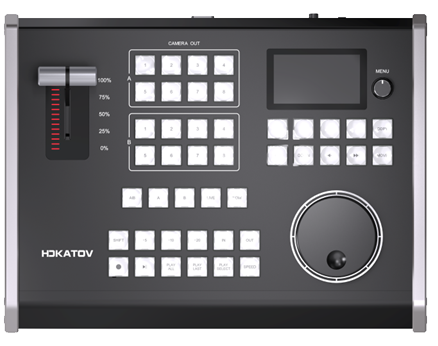
Play, pause, live, jump-to-now, event playback, and output control are all available from the panel surface.
A clear customer guide to KD61B functions, setup, and choosing the right connection mode.
Choose vMix-TCP for the fastest path to operation. Choose vMix-USB (MIDI) when your team needs deeper replay customization and more flexible control logic.
For most customers, the decision comes down to one question: do you want faster setup, or deeper customization? This section makes that choice easier.
Best for customers who want KD61B online quickly with less setup, no config file, and a smoother plug-and-play experience.
Best for customers who want custom button behavior, more workflow control, and deeper replay logic inside vMix.
| Decision Point | vMix-TCP | vMix-USB (MIDI) |
|---|---|---|
| Best For | Fast setup and daily operation | Advanced replay workflows and custom control |
| How It Connects | Network (TCP/IP via PC IP + port 8099) | USB as a MIDI device |
| Getting Started | Enter the vMix PC IP on KD61B and start controlling | Enable MIDI in vMix, load config, then finish mapping |
| Setup Time | Lower | Higher |
| Extra vMix Setup | No shortcuts or activators required | Shortcuts and activators required |
| Config File | Not needed | Required: KD61B_V0.0.10_vMix.config |
| Button Customization | Limited button mapping | Flexible mapping for advanced operators |
| Control Depth | Straightforward replay control | Full replay control with more workflow freedom |
| Web Custom Buttons | Supported | Supported |
| Recommended Choice | Choose this when you want plug-and-play simplicity | Choose this when you want deeper customization |
This page is not only about connection methods. Customers also need to see what KD61B actually helps them do during a live show.
Play, pause, live, jump-to-now, event playback, and output control are all available from the panel surface.
Operators can mark clip boundaries quickly during live action and build replay packages without leaving the hardware.
Dedicated camera selection supports multi-angle replay workflows and fast operator response during live production.
The jog wheel and speed controls help with frame search, slow motion, and precise replay timing.
Web-customizable buttons are available in both modes, while USB MIDI gives deeper mapping flexibility for advanced operators.
KD61B can serve simple plug-and-play setups or more advanced replay systems depending on the connection mode you choose.
Keep the setup paths separate so customers can follow the exact workflow that matches their chosen mode.
Direct customers to the main downloads page for current files and product resources.
Download KD61B_V0.0.10_vMix.config directly for USB MIDI setup and advanced vMix mapping workflows.
Add screenshots later if you want to turn this page into a stronger onboarding page for first-time buyers.
This image shows the KD61B replay layout and the custom-button area used with the vMix web interface.
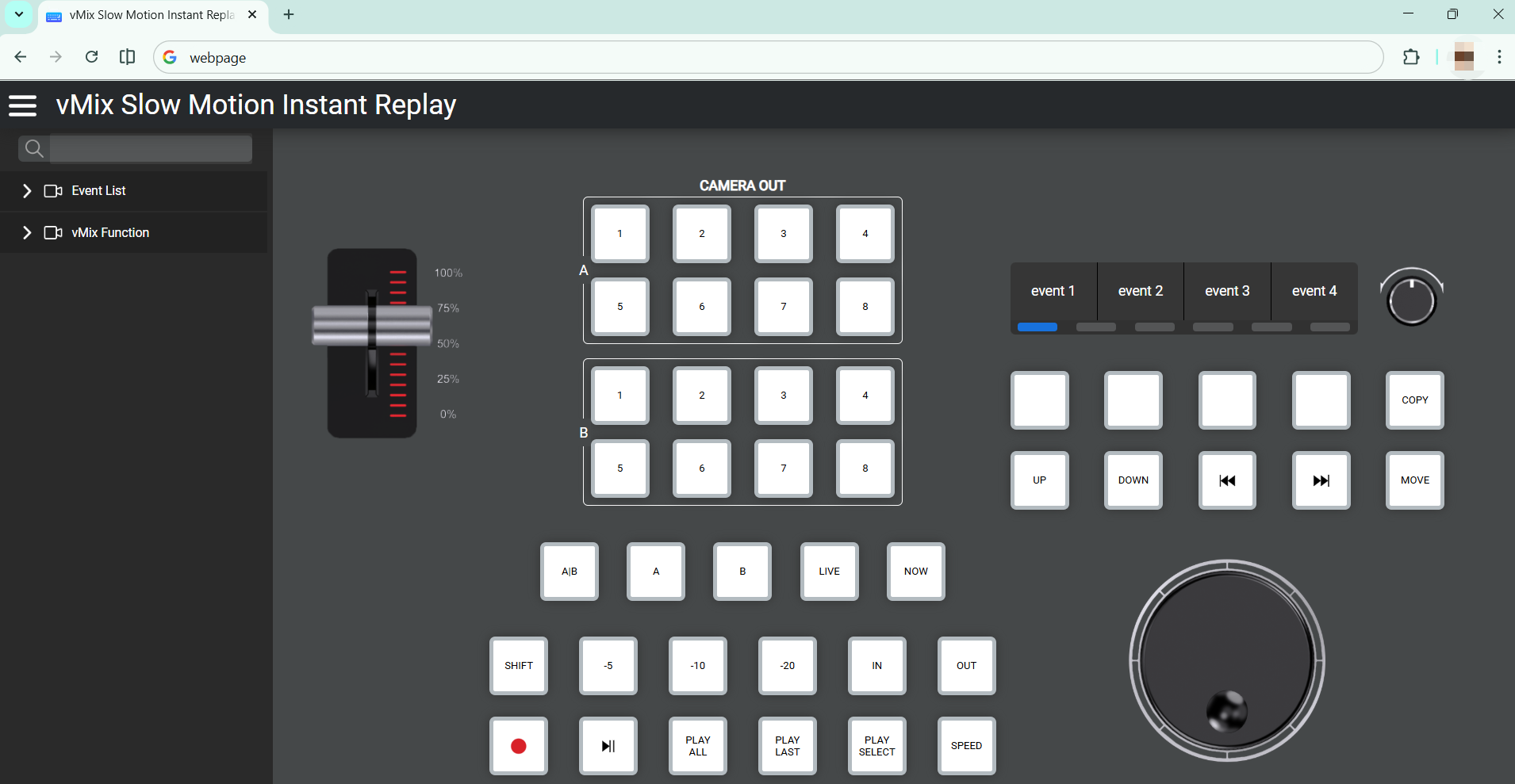
For customers using custom workflows, these references show the event slots and vMix replay functions that can be assigned to the four custom buttons on the upper-right area of the KD61B panel.
These event list targets can be placed on a custom button for faster access during replay operation.
These replay-related vMix functions are available as assignable actions for the custom buttons.
vMix-TCP is easier. It does not require shortcuts, activators, or an extra config file, so it is the faster option for basic replay control.
vMix-USB (MIDI) is better for customization because button mapping is supported and more flexible for advanced replay workflows.
Yes. Both connection modes support web-customizable buttons on the KD61B.
Choose TCP when you want a faster setup, less configuration, and reliable day-to-day control without extra workflow design.
KD61B gives you two practical paths: faster deployment with vMix-TCP, or deeper customization with vMix-USB (MIDI). Choose the mode that matches your operators, your replay workflow, and your production pace.